

Build system changes in R2027

In C4D R2025.2, Maxon started to move away from the project tool build system in previous releases and towards using CMake instead. This has been continued in R2027, so that now a pure CMake system is used. This has resulted in some changes to building C++ plugins.
Fortunately, there's no need to rebuild plugins for R2027 if we already have an R2026 build, because plugins compiled with R2026 will run in R2027. But if we don't have an R2026 version of the plugin and don't need one, or if we want to make use of additional features in R2027, we will need to build in that version. A previous articlelooked at how to build plugins in R2025.2, and this article looks at some of the changes we need to make in R2027.
The first thing is that the projectdefinition.txt file is now wholly redundant. Instead, R2027 uses CMakeLists.txt files instead. There is one of these files for each plugin, located in the plugins\plugin_name\project folder, the same place as the projectdefinition.txt file would have been located. We will need to create such a file for every plugin we build, and there are two ways of doing this. If we are building an older project which has a projectdefinition.txt file, the easiest way is to let CMake take that file and create the CMakeLists.txt file from it. It is advisable to check the resulting file, but in my experience it usually works fine.
Creating a new CMakeLists.txt file
If it's a new project, however, we will need to create a new CMakeLists.txt file for it and place that in the \plugins\plugin_name\project folder. One way to do that is to copy an existing file and modify it as required. An obvious choice is to copy the file from the example.build project supplied with the SDK, but that is surprisingly complex and it's much easier to use the file from example.main. Here is a screen shot of that file, with the lines we need to change highlighted:
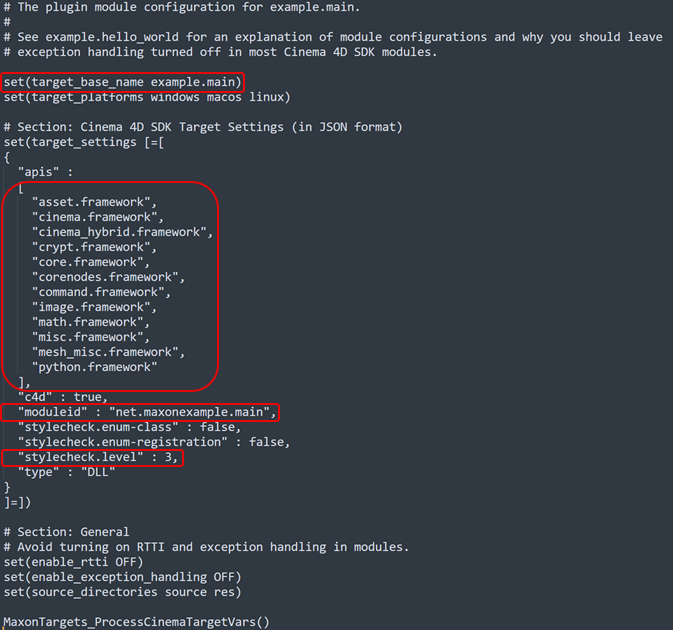
The changes needed are as follows. I will use the example of my ArrowMaker plugin to show what changes need to be made.
1. Project name
This is on line 6 of the example.main file and would be changed to:
set(target_base_name ArrowMaker)
If we don't do that, the project will be named 'example.main' and the plugin itself will be named 'example.main.xdl64'!
2. Frameworks
We also need to make sure that we have included all the frameworks needed. Including those we don't need doesn't matter as long as in CMake we leave the switch "MAXON_FILTER_UNUSED_FRAMEWORKS" turned on.
3. Module ID
On line 28, this becomes:
"moduleid : "uk.co.microbion.arrowmaker",
4. Style check
This is optional, but I always turn this off. On line 31, this would change to:
"stylecheck" : false,
Once this is done, we can run CMake again to configure and generate the build system and the plugin will build, although we may need to make some changes in the source code to get it to compile. For example, some of the C4D resource definition files have changed, so we might need to add new header files to fix that.
The ever-growing solution
The problem with this method, which is the default Maxon-recommended way, is that whenever we add a new plugin the solution is updated to include it - which means that the solution contains all the previous plugins plus the new one added. I have 21 plugins available on this site, so if I rebuilt them all, that would yield a solution with 28 projects in it, my 21 plus the 7 SDK examples. That doesn't matter too much, because the older plugins won't be rebuilt all over again when a new one is added, but it's...messy, untidy. As with R2025 and R2026 I'd prefer to have each plugin in its own build folder, but how to do this with R2027?
There is a way but it isn't quite as satisfactory as the previous method. We could certainly create a different build folder for each plugin, but CMake would still include all the plugins it finds (that is, everywhere it finds a CMakeLists.txt file) in the solution. This happens because there is another CMakeLists.txt file, in the root directory of the builds - that is, the folder holding the subdirectories such as \frameworks, \plugins and \tools. In that file there are these two lines:
# By default we use this function to discover and include all modules in the specified modules directory.
MaxonSDKTools_DiscoverModules(MODULES_DIR "${MAXON_SDK_MODULES_DIR}")
This is what causes CMake to add every plugin it finds in the \plugins folder to the solution. If we only want one plugin, the above line needs to be commented out. Then, as the CMakeLists.txt file specifies, we can add a specific folder which contains a CMakeLists.txt file. In the case of ArrowMaker, that line would look like this:
add_subdirectory(plugins/ArrowMaker/project)
If the solution is now loaded, we see that it only contains the one plugin project.
However...
This all sounds good, but there are three things to consider. First, we need to be really careful when editing that 'master' CMakeLists.txt file. A mistake could prevent a build system being generated or the project not building correctly, or at all. Maxon have delineated the lines which we can change within a block headed 'Customization Start' and 'Customization End'. The two changes mentioned above do fall in that block, so that is fine.
Secondly, it will be necessary to edit that master file for each new plugin requiring a build system, which is inconvenient. And finally, although the plugin builds and runs, the output of building the solution is not quite the same as the default method. In the Maxon recommended method, the plugin binary will be saved to this location on my system:
\C4D Plugins\C4D_2027\_build_x64_v143\bin\Debug\plugins\ArrowMaker
But with the single-project method, the save location is this:
\C4D Plugins\C4D_2027\_build_x64_ArrowMaker\plugins\ArrowMaker\project\Debug
I don't know why that is, or whether it matters. Using WinMerge to compare the binaries, there are quite a lot of differences though both seem to work correctly. One thing is that in the default method there is also a symbolic link to the 'res' folder for that plugin, whereas in the single plugin method, there isn't.
Another way
There is an alternative way to get round this. Recall that CMake will include all projects for which it finds a CMakeLists.txt file. All we need to do is disable all those files except the one(s) we want. For example, I rename them to 'CMakeLists.txt_DISABLED'. Then CMake will only create a build solution for the specific plugin we want to build, and this time the correct directory structure is preserved including the symbolic link to the 'res' folder. We do see CMake errors during the configuration process - CMake complains that one or more projects has no CMakeLists.txt file, which of course is intended - but it still generates the build correctly. This is my preferred method.
In conclusion
I really do prefer having each plugin in its own build folder without any other plugins in the generated solution. It's an easy matter to disable the plugin build for those we don't want, and if we ever need to generate the build solution again, all we need to do is rename the disabled file back to the correct name. If that doesn't appeal, then we can just follow the Maxon way and accept the ever-expanding solution file.
Page last updated October 20th 2026