

Old Poser assets

Are Poser assets from back in the day of any use today?
I'm in the process of a complete revamp of my office. That, inevitably, means sorting out drawers, shelves and cupboards of stuff that I obtained years ago and was never ruthless enough to throw out. A long time ago, meaning the late 1990s to early 2000s, my first foray into the world of 3D graphics was the same as many people: I used 'Poser'.
Poser, for those who don't know about it, was originally developed as an aide to artists, allowing them to pose 3D figures on screen and use them as a template or model for an actual painting or drawing. It was a digital version of those posable wooden figures you can buy in art shops. Pretty soon though, it started to be used to create images in its own right, and spawned a huge industry of third-party add-ons, such as human and animal figures, morphs for those figures, props including buildings, clothing, weapons...well, everything you could want, up to and including, er, adult material. Poser had its own render engine complete with lights and cameras and for newcomers to 3D computer graphics it was a much gentler introduction than one of the big DCC apps at that time, which included Lightwave, 3DS Max, Maya, and Cinema 4D.
For that reason, it's fair to say that Poser users were looked down on by those who preferred the more powerful but harder to use software. Nevertheless, it was extremely popular and still exists to this day, though it seems to have been supplanted to a great extent by its rival, Daz Studio. It's worth noting that these apps were closely linked in that Daz models could be used in Poser while Poser models could be imported into Daz Studio, and that is still the case today.
Anyway, my clearing out process yielded a considerable quantity of Poser material - all of which I'd stored carefully on DVDs, 22 of them to be precise. I had even catalogued the content of these disks using a spreadsheet, so even after many years I found that I knew exactly what each asset was. I stopped using Poser in the early 2000s, when I found that creating my own models and coding plugins was more fun than using canned models created by others. However, the use of third-party assets in scenes seems to be perfectly acceptable nowadays, so when I was about to throw these disks out, the question was this: were they of any use at all, and could the content be made usable in Cinema 4D or other apps such as World Creator?
Human/animal figures
The thing about Poser and Daz Studio is that each such figure comes with a set of controls right out of the box which could morph the model to alter its physical characteristics - you could make it appear more (or less) muscular, for example, and move the figure into any desired pose. This functionality was, and as far as I know still is, pretty much unique. However, would it be possible to transfer that functionality to some other app such as Cinema?
Other props
There was and is a vast range of Poser/Daz props to add to scenes. Some of these are pretty good and should be readily usable in other apps because most don't use the morphing system the figures use. However, they are provided in their own file format, so aren't directly usable without some kind of conversion process first.
Lights, cameras and materials
A Poser/Daz scene will probably contain both lights and cameras and getting these transferred is going to be hit and miss in many cases. Lighting that works in the Poser/Daz renderers may not be successful in Cinema, for example. But that doesn't really matter. The purpose of importing these models into other DCCs is to make use of the more advanced render engines in those apps, which would require the cameras and lights to be redone anyway, in all likelihood. The same is true of materials, which might require some adjustment, and in any case can't be transferred if they use shaders native to Poser or Daz. Most textures, however, will be bitmaps, and these will transfer without problems..
So, can these assets be used in Cinema?
There are three possible ways in which this could be done.
1. The most recent version of Poser can export models in a variety of formats, so one option is to load the asset into Poser then export it as an .fbx or .obj format file. This should work but how successfully I don't know as Poser is not free software and I don't intend to purchase a new licence. But it would mean that while an exported model might be easily usable in C4D, the unique morph and pose functionality of Poser/Daz Studio would be lost.
2. The next option would be to use Daz Studio. The basic version of this is free, can import old Poser assets, and like Poser it can export models into various formats. These include the native .c4d format, but when I tried to export a prop in that format it had failed to complete the save after four minutes and I had to use the task manager to shut Daz Studio down. However, there is also a Daz to Cinema 4D Bridge plugin. This purports to convert figures or props in a Daz Studio scene and load them into Cinema, complete with textures, lights and so on. If it worked, that would be ideal.
It's worth mentioning that some of the Daz assets are also available in native Cinema 4D format, so no conversion is required. While Daz Studio itself is free (though not the Pro version) most of the assets must be paid for.
3. The third option would be a third-party plugin to allow Poser models to be directly imported into C4D and retain all the functionality of the posing/morphing system. Believe it or not, such a plugin used to exist: 'Interposer' was a very clever plugin for Cinema which did exactly that. I say 'used to exist' because it hasn't been available for Cinema since perhaps C4D R13 - which was a long time ago. But if you still had access to R13, and a licensed copy of Interposer, it should still be possible to load Poser models into R13, pose/morph as required, save the file, load it into R19 and resave it (because the latest C4D release can't load files saved in R13) and then load into R2026 or whatever recent version desired. You still wouldn't have the full functionality after leaving R13, but it would work to import the model.
The Daz to C4D Bridge
It's pretty obvious that the Daz plugin is the way to go if it does what it says on the tin, as it's current and still being maintained. The bridge, which is free, has to be installed into Daz Studio then a plugin into Cinema, but that's only needed once. From then on, the way it works is like this:
- Add the figure or prop to a scene in Daz Studio. Make any adjustments and changes to it required in that app.
- Select the item(s) to be exported and choose 'Send To...' from the Daz Studio file menu, then 'Cinema 4D' from the resulting submenu.
- Daz Studio does whatever is needed then tells you that it's all done and that you should now go into Cinema to complete the process.
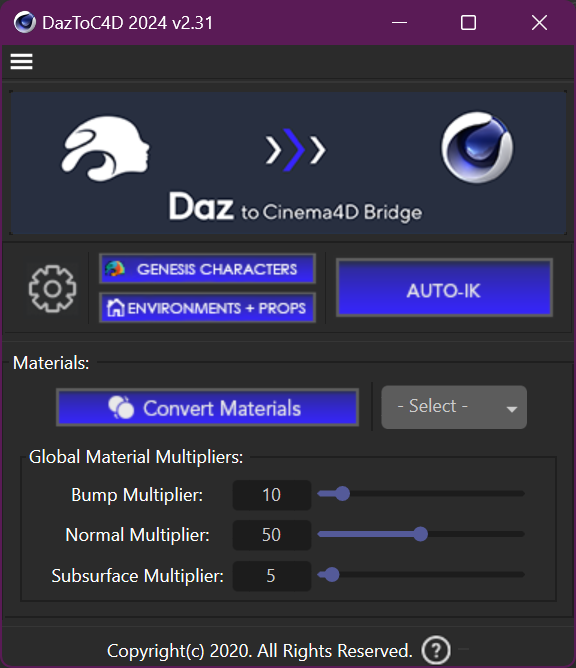
- In Cinema, there will be a separate 'Daz 3D' menu in the main menu bar. Select the menu entry 'Daz to C4D' and a dialog box appears - from this, you can choose the type of item you're importing, and the material type (Standard, Redshift, Octane or Vray).
- The object is imported and that's it. You may need to make adjustments to lights, materials, etc., but otherwise it just works. Of course, whether or not the item is usable in the scene depends on the quality of the original Poser or Daz asset, the conversion process won't alter that.
These images show the (comprehensive) export options in Daz Studio and the corresponding import plugin in C4D R2025:
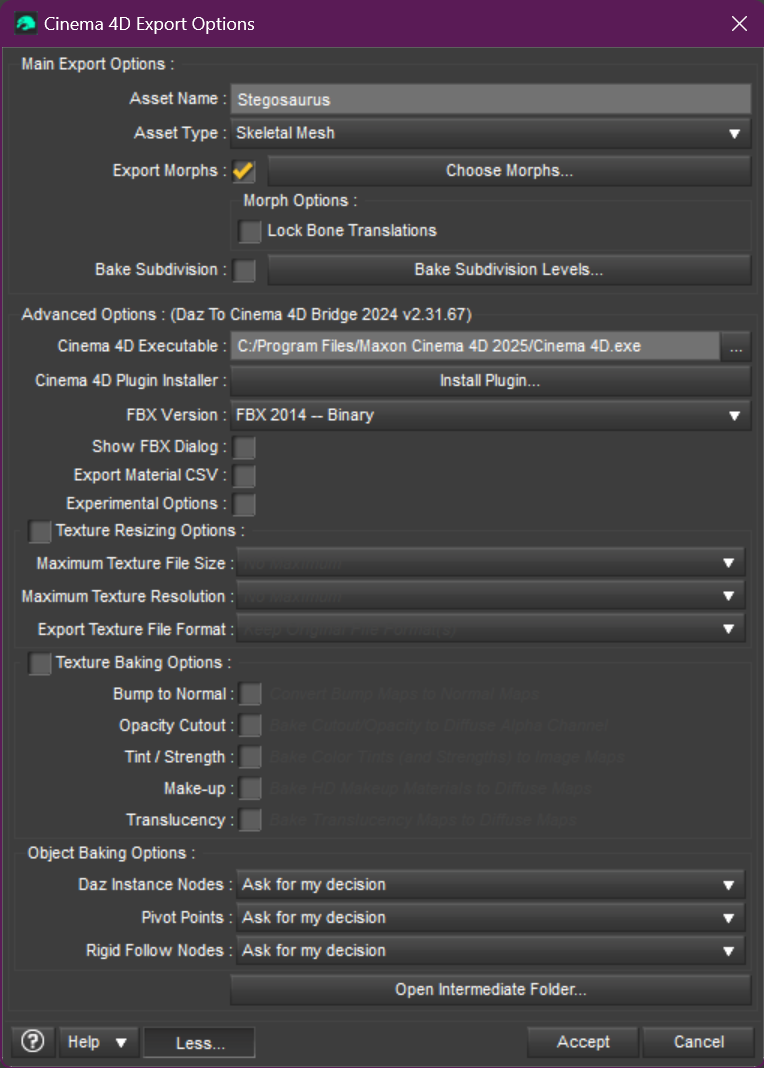
- daztoc4dstudio
Daz to C4D Bridge (in Daz Studio)
- daztoc4dplugin
Daz to C4D Bridge (C4D plugin)
With the same prop I tried to export directly into .c4d file format but which failed to complete, the bridge only took a few seconds and worked perfectly. As far as I can tell, what it is doing is export the geometry in .fbx format, then in Cinema the plugin imports the geometry, creates and assigns the materials, and rigs the figure if it had rigging in Daz Studio. For a character figure, the bridge will convert the poses in Daz Studio to the C4D rigging system with bones, which you can then use to change the pose. I tested the bridge in Cinema R2025 and R2056 but it's a Python plugin and may work in other Cinema versions as well, or there may be older versions available.
For those who don't have Cinema, or don't have a version in which the bridge can be used, Daz also have a Daz to Blender bridge available, so that could be used as an intermediate step to World Creator, for example.
Personally I'm not much interested in the human/animal figures - though the ability to use them if required is nice. But the props are a different matter. Some of these are really good and I can now get them into Cinema, export them as a .glb file, and reload into World Creator if I want to.
Conclusion
The moreof the story is this: faced with a bunch of seemingly redundant digital assets, don't throw them away. You never know when they might come in useful again.
Page last updated March 2nd 2026