

Creating a new plugin: 6

The basic data we will need for generating bonds
From the previous article, we know that PDB files do not contain details of every connection between atoms and we have to infer them from the standard structure of the amino acids used to build proteins. To do this we had to create a list of all possible bonds in the 22 amino acids we might encounter, the number of bonds varying between different amino acids. In fact there are 175 possible bonds, and we have them stored in a text file (actually a CSV file) which is supplied with the plugin. This text file is loaded when the plugin is initialised and the bond list held in memory in a BaseArray of structs, each struct representing one bond. The struct is very simple:

and the array of these structures is a class-level BaseArray named 'm_ProtBonds'.
Bonds will be displayed by splines
Each bond is a spline (or part of a spline) which we can use either to produce geometry or render directly without geometry. Let's assume for the moment that we obtain the two points which will let us generate a spline for the bond; each point will, of course, be the location of the atoms which are to be linked. How are we going to generate the splines? There are three possible solutions.
- The simplest method is to generate a SplineObject containing two points for each bond. However, there could be several thousand atoms in a protein and that will mean several thousand bonds. Do we really want to add potentially thousands of SplineObjects to the scene, plus as many Sweep objects if we are to generate geometry. It doesn't sound very efficient or very sensible given Cinema's notorious viewport problems when it comes to handling many objects in a scene.
- An alternative is to generate one spline per residue. That would certainly cut down the number of SplineObjects and Sweep objects. The problem is that the spline can't be continuous. As we've seen, atoms aren't linked in an unbroken chain, so a single long spline would look quite wrong. We can get round that by creating a spline with multiple segments, one segment per bond, but if we are going to do that then we get...
- One spline for all the bonds in the peptide chain. The spline will need multiple segments but it only requires one SplineObject and one Sweep object. That would seem to be the most efficient solution and it's the one we will choose.
The algorithm
Before we start, we recall that we have two BaseArrays available, which are:
- m_ProtAtoms: the array of all the atoms in the molecule, loaded from the PDB file and where one entry in the array equals one ATOM record from the file;
- and m_ProtBonds, the array of all the possible bonds in each of the 22 amino acids, loaded from the CSV file.
The first thing is to get the entry for the first atom in the first residue in the chain. That entry will give us two things: the name of the residue (e.g. 'GLY' or 'HIS', etc.) and the sequence number of the residue. That number is supposed to be 1 for the first residue, and increment by 1 for each subsequent residue, but these rules seem more like guidelines! It doesn't matter what the actual value is, though. All that matters is that each residue has a different number and all the atoms in that residue have the same number.
Next, we need the list of bonds for that residue type. We can find that using the residue name from the atom. So, the first code would look like this:
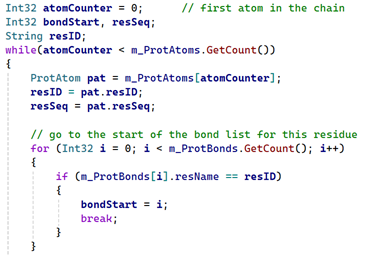
We now can find each bond for this residue type in the bond list. From each bond, we can get the names of the two atoms which make up the bond, such as 'CA' and 'CB'. We would then iterate through all the atoms in that specific residue in the chain until we find those two atoms, and when we do, add their positions to an array of vectors. Then we do the same for every bond in that residue, and repeat for every residue in the chain. That gives us an array with a number of points, each pair of points representing the start and end point of a spline segment.
There's one other thing we'll need to do, though. As well as the bonds between atoms in a residue, we will add the bonds between residues in the peptide chain. This is slightly tricky because it spans two residues. Peptide links occur between the carbon of the carboxyl group attached to the alpha carbon of one residue, and the nitrogen of the amino group attached to the alpha carbon in the next residue in the chain. An additional complication is that the amino group of the first residue isn't attached to anything, and the carboxyl carbon of the last residue isn't attached to anything either. Fortunately, the carboxyl carbon always has the name 'C' and the corresponding nitrogen is named 'N'.
The easiest way to deal with this is to add all the positions for peptide bonds to a separate array of vectors. So the code would look like this:
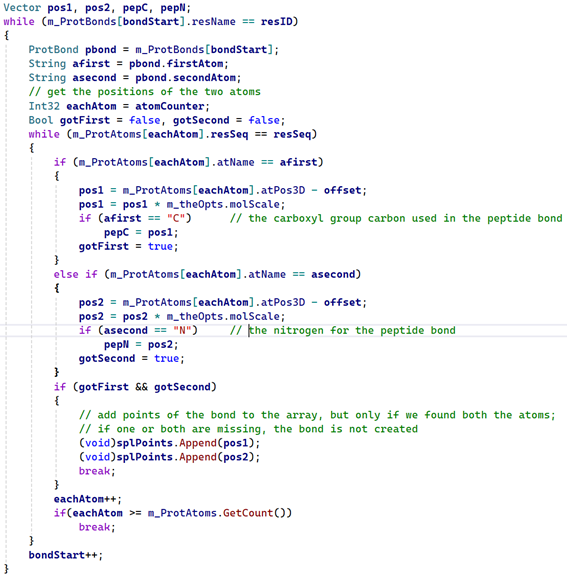
All this code does is iterate through all the atoms in the chain which have the same residue ID value - in other words, the atoms which are part of the same amino acid. Then it looks for the two atoms which form each bond, the names of the atoms coming from the bonds list for the residue type. When it has found both the atoms, but only if it finds both (in case of errors in the PDB file) the atom positions are added to the array of vectors. The other thing it does is to look specifically for atoms named 'C' and 'N'. Because I wrote the bonds list, I know that in the bond between the carboxyl atom 'C' and the oxygen atom 'O' in any residue the 'C' is always the first atom. So I just need to check if the first atom in each bond is a 'C' and if it is, store its position in a vector named 'pepC'. I also know that the nitrogen atom 'N' which is linked to the alpha carbon is always the second atom in the bond, so I can find it and store its position in 'pepN'.
In the code 'splPoints' is simply an array of vectors which are the atom positions for the bond start and end. The final thing that is done (and it has to be done outside the 'while' loop) is to add the peptide atom positions to another array, which we'll call 'pepPoints':
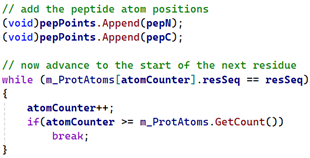
The above code also shows that we have to advance to the start of the next residue so that we can repeat the above with all residues in the chain. We do this by checking the residue sequence number, and when it changes, update the variable 'atomCounter' to point to the first atom in the next residue.
Having done all this, we must create the spline for all the bonds. That will be in the next instalment of this series.
Page last updated May 28th 2026