

Creating a new plugin: 7

Making bonds
In the previous article, we finished with two arrays of vectors, named 'splPoints' and 'pepPoints'. Now we need to make those into a single spline. We are also, at some point, going to have to deal with proteins with multiple chains, but for the moment let's get something generated so we can see what it looks like.
The first thing we'll do is add the peptide bond points to the main points array as it's easier to deal with one array rather than two. If we wanted - and we might at some point - to display peptide bonds separately, we can do that, but for the moment one array is enough. But there's another issue. If you think about any polypeptide chain, the amino group of the first amino acid is not involved in the chain at all, and neither is the carboxyl group of the last residue in the chain. Currently our peptide points array contains those two atoms, but we need to exclude both. The code would look like this:

We still have an even number of points in the array, but we don't include the first or last entries in 'pepPoints'. Now we have one array of points, we can call a separate function to create the spline, like so:

In this snippet, 'retNull' is a pointer to a null object which was declared earlier in the function. This null object will be returned to GetVirtualObjects and returned by it to the scene. The reason for doing this is in case we want this function to generate more than one spline and return them both at the same time. I can't tell yet if this is going to be needed, but I'm just thinking ahead.
Creating the spline
The core of the function looks like this:
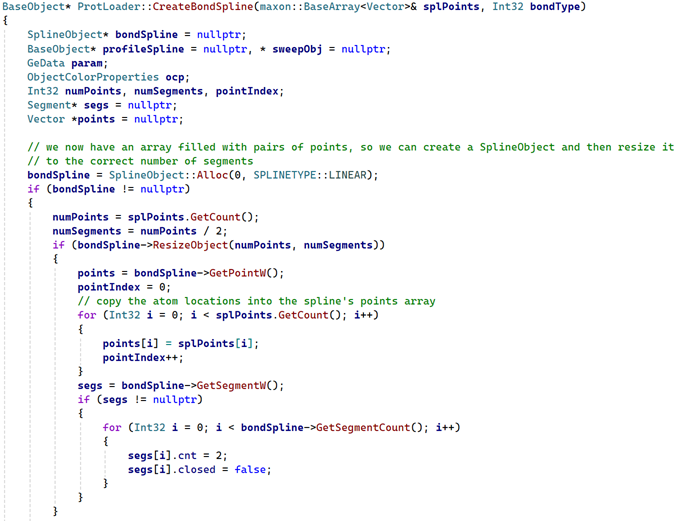
What this does is create a SplineObject. Although we know the number of points (the number of entries in the array 'splPoints' passed to the function) we already know that this has to be a multi-segment spline, it can't be one long chain - and we can't specify the number of segments when creating the spline. However, it's easy to work out how many we'll need, since each segment must contain two points - so the number required is the number of points divided by two. Then we can call the SDK function SplineObject::ResizeObject() with the number of points and segments we need.
The rest is easy. Get the writable points array from the spline, copy the vectors from 'splPoints' into it, then get the writable segments array and for each one set the segment to contain two points and not to be closed.
We could return the spline at this point and it would work, but there's a bit more we should do. I won't bother showing code for this, it's all straightforward stuff, but if we want to generate geometry the steps are:
- create a Circle spline primitive to be a profile spline
- create a Sweep object and set its properties, including colour
- insert the Circle and our created spline under the Sweep object
- return the Sweep object to the calling function
We might want the spline to be rendered without adding geometry, but that is rather more complex so we can add that later if necessary.
The result
Here's our glucagon molecule including bonds:
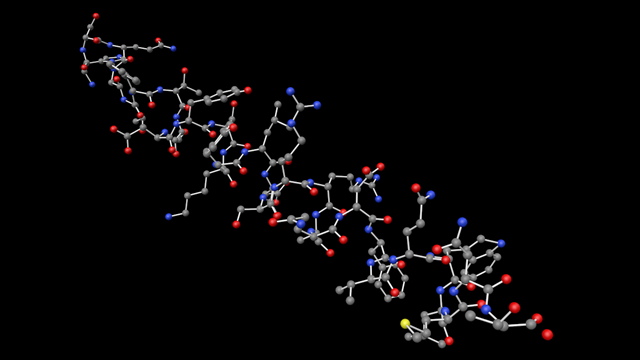
There's a problem here. Take a close look at the end of the chain in the bottom right-hand corner. There's an oxygen atom (red sphere) which isn't connected to anything! There's a reason for that which we need to fix, and we also need to handle multi-chain proteins. Plus there are also a couple of other issues which need to be dealt with. We'll do that in the next two articles.
Page last updated May 31st 2026